How to convert `JavaDoc to @Schema` for field
Updated
•1 min readI'll show you how to convert javaDoc to @Schema in Intellij idea using Live Templates.
Template text:
@io.swagger.v3.oas.annotations.media.Schema(description = "$RESULT_OF_THE_CONVERSION$")`
Also we need to convert variable(button - Edit Variables):
Name: $RESULT_OF_THE_CONVERSION$
Expression:
groovyScript("return getCleanComment(_1); String getCleanComment(sS) { if (sS == null) return null; def afterTrim = sS.replaceAll('/', '').replaceAll(/\*/, '').replaceAll(/\n/, '').trim(); return replaceSpaces(afterTrim) };String replaceSpaces(sourceString) { while (sourceString.contains(' ')) sourceString = sourceString.replaceAll(' ', ' '); return sourceString }", SELECTION)`
Default value: keep empty
Skip if defined: true
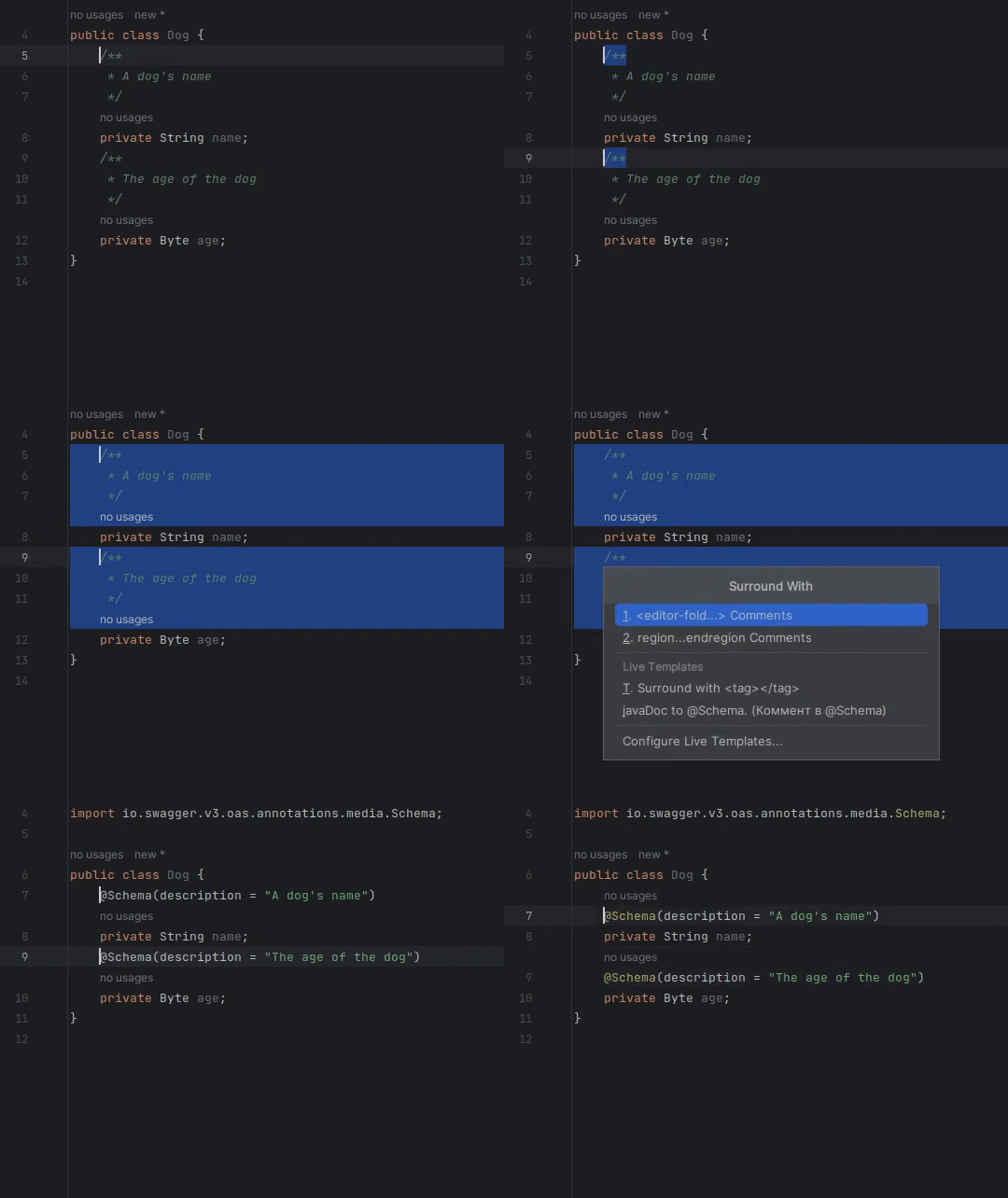
Now we can select javaDoc comments and call the Surround with command.
Choose our Live template - in this example is JavaDoc to @Schema: